Role Security
OneTap Login implements strict role security to prevent privilege escalation attacks. This guide explains how role restrictions work and why they're important.
Overview
The Security Model
OneTap Login enforces a security model where:
- High-privilege roles cannot be assigned via Google sign-in
- Only safe, limited-privilege roles are allowed
- Admins control the default role for new registrations
- Existing user roles are never changed
Role Categories
| Category | Roles | Via Google Sign-In |
|---|---|---|
| Forbidden | Administrator, Editor, Shop Manager | ❌ Never |
| Allowed | Subscriber, Contributor, Author, Customer | ✅ Yes |
| Custom | Depends on capabilities | Analyzed |
Forbidden Roles
What Are Forbidden Roles?
Roles that cannot be assigned to users who register or log in via Google:
| Role | Capabilities | Why Forbidden |
|---|---|---|
| Administrator | Full site control | Could delete site, add backdoors |
| Editor | Edit all content | Could modify any content |
| Shop Manager | Full store access | Could access orders, change prices |
Why Forbid These Roles?
Attack Scenario Without Protection:
1. Attacker creates Google account
2. Attacker registers via Google sign-in
3. Site assigns "administrator" role
4. Attacker has full control
5. Site compromised
With OneTap's Protection:
1. Attacker creates Google account
2. Attacker registers via Google sign-in
3. OneTap checks requested role
4. "Administrator" forbidden
5. Assigns safe default role instead
6. Attack prevented
How Forbidden Works
// Forbidden roles array
$forbidden_roles = [
    'administrator',
    'editor',
    'shop_manager',
];

// Check before assigning
if (in_array($role, $forbidden_roles)) {
    // Fall back to safe default
    $role = 'subscriber'; // or 'customer' for WooCommerce
}
Allowed Roles
Safe Roles for Registration
| Role | Capabilities | Use Case |
|---|---|---|
| Subscriber | Read only, profile management | Basic membership |
| Contributor | Write posts (pending review) | Content contributors |
| Author | Publish own posts | Blog writers |
| Customer | Shop, place orders | WooCommerce stores |
Default Role Selection
In Settings > OneTap Login > Users:
Default Role: [Customer ▼]

Options:
├── Subscriber (WordPress default)
├── Contributor
├── Author
└── Customer (WooCommerce)
WooCommerce Consideration
For WooCommerce sites:
- Customer is the recommended default
- Has WooCommerce-specific capabilities
- Can view orders, manage account
- Cannot manage products or store
Role Assignment Flow
New User Registration
Google sign-in successful
        ↓
User doesn't exist (new registration)
        ↓
Get configured default role
        ↓
Check if role is forbidden
        ↓
    Forbidden → Use safe fallback
        ↓
    Allowed → Assign configured role
        ↓
User created with safe role
Existing User Login
Google sign-in successful
        ↓
User exists (returning user)
        ↓
Keep existing role unchanged
        ↓
User logged in
Important: Existing users' roles are never modified.
Custom Roles
Analyzing Custom Roles
For custom roles created by themes/plugins:
// OneTap analyzes capabilities
$role = get_role('custom_role');

// Check for dangerous capabilities
$dangerous_caps = [
    'manage_options',      // Admin settings
    'edit_others_posts',   // Edit all content
    'edit_shop_orders',    // Store management
    'delete_users',        // User management
    'install_plugins',     // Code execution
];

foreach ($dangerous_caps as $cap) {
    if ($role->has_cap($cap)) {
        // Custom role is forbidden
        return true;
    }
}
Safe Custom Roles
Custom roles are allowed if they don't have:
manage_optionsedit_others_postsedit_shop_ordersdelete_usersinstall_pluginsedit_pluginsedit_themesswitch_themes
Role Mapping (PRO)
Domain-Based Role Assignment
PRO feature allows mapping email domains to roles:
@company.com    → Author
@partner.com    → Contributor
Default         → Subscriber
Security Checks
Even with role mapping:
- Mapped role checked against forbidden list
- If forbidden role mapped, falls back to safe default
- Cannot bypass security via role mapping
Example Configuration
Domain: company.com
Role: Author ✅ (allowed)

Domain: admin.company.com
Role: Administrator ❌ (forbidden - falls back to default)
Administrative Overrides
Manually Changing Roles
Administrators can still:
- Change user roles in WordPress admin
- Promote Google-registered users
- Use bulk role changes
This is intentional - admin actions are trusted.
API/CLI Changes
Role changes via:
- WP-CLI
- REST API (with auth)
- Database directly
These bypass OneTap's restrictions (by design).
Attack Prevention
Privilege Escalation Attack
Without Protection:
1. Register as customer via Google
2. Find vulnerability in role assignment
3. Request administrator role
4. Gain full access
With OneTap Protection:
1. Register as customer via Google
2. Any attempt to assign admin role blocked
3. Always falls back to safe role
4. Attack fails
Email Spoofing Attack
Attempt:
1. Create Google account with admin@site.com
2. Register via Google
3. Hope for admin role
Protection:
1. Google account created
2. OneTap validates, creates account
3. Role is "customer" regardless of email
4. Email doesn't influence role
Account Takeover Prevention
With Account Merge (PRO):
1. Attacker can't take over admin account
2. Must know existing password
3. Even if email matches admin
4. Role remains unchanged
Configuration
Settings Location
Settings > OneTap Login > Users
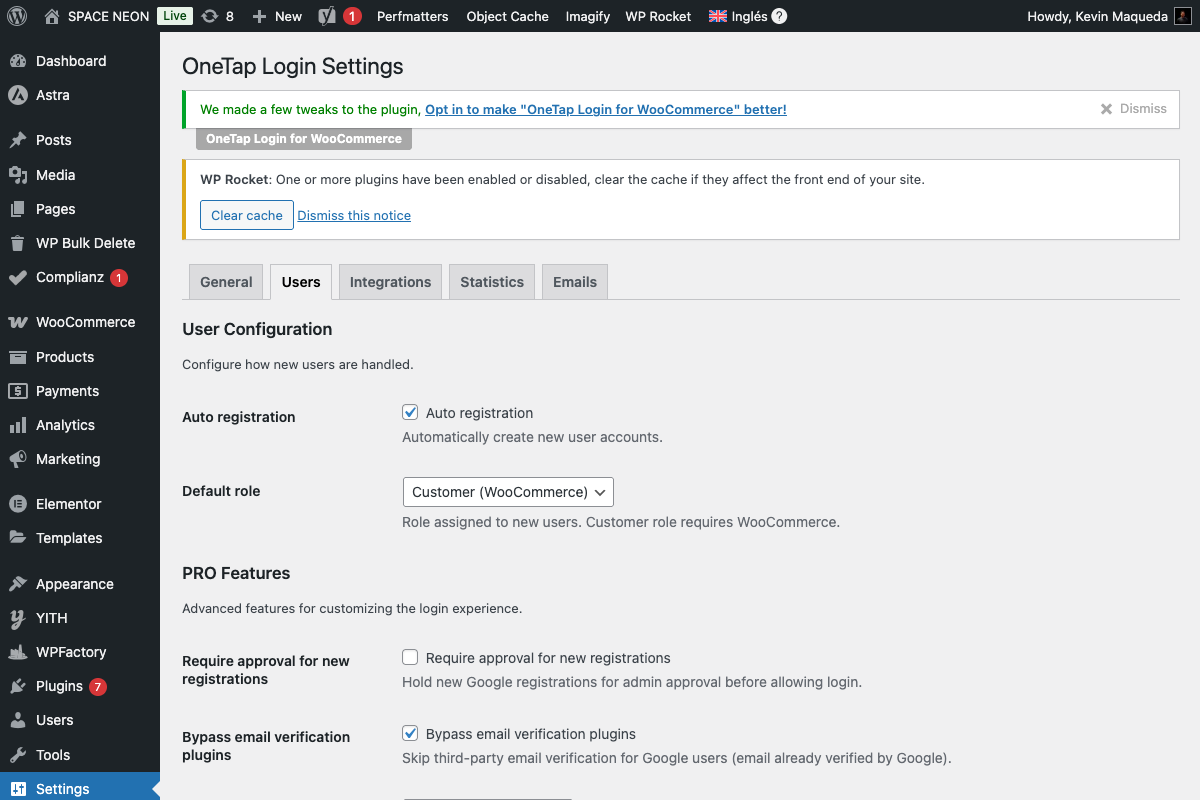
Available Settings
| Setting | Options | Description |
|---|---|---|
| Auto-register | Yes/No | Create new accounts |
| Default role | Dropdown | Role for new users |
Recommended Settings
| Site Type | Default Role | Auto-register |
|---|---|---|
| E-commerce | Customer | Yes |
| Blog | Subscriber | Yes |
| Membership | Subscriber | Yes |
| Private site | Subscriber | No (invite only) |
Hooks for Developers
Filter Default Role
add_filter('onetap_default_role', function($role, $google_data) {
    // Custom logic for role assignment
    // Still checked against forbidden list

    // Example: Different role for certain domains
    if (str_ends_with($google_data['email'], '@company.com')) {
        return 'author';
    }

    return $role;
}, 10, 2);
Filter Forbidden Roles
// Add additional forbidden roles
add_filter('onetap_forbidden_roles', function($roles) {
    $roles[] = 'shop_staff'; // Custom role
    return $roles;
});
Check Role Assignment
add_action('onetap_before_role_assign', function($user_id, $role) {
    // Custom validation before assignment
    if ($role === 'author' && !meets_criteria()) {
        // Prevent assignment
        throw new Exception('Role requirements not met');
    }
}, 10, 2);
After Role Assigned
add_action('onetap_role_assigned', function($user_id, $role) {
    // Track role assignments
    update_user_meta($user_id, '_onetap_assigned_role', $role);
    update_user_meta($user_id, '_onetap_role_date', current_time('mysql'));
}, 10, 2);
Troubleshooting
User Got Wrong Role
Causes:
- Default role misconfigured
- Plugin conflict changing role
- Other plugin assigning role
Solutions:
- Check Settings > OneTap Login > Users
- Disable other plugins temporarily
- Check user meta for assignment source
Can't Assign Higher Role
This is expected behavior. To promote users:
- Go to Users > All Users
- Find the user
- Change role via WordPress admin
Role Mapping Not Working
Causes:
- PRO feature not active
- Domain not matching
- Forbidden role mapped
Solutions:
- Verify PRO license
- Check exact domain match
- Use allowed roles only
Best Practices
Do's
- Use minimal necessary roles
- Keep default as Customer/Subscriber
- Regularly audit user roles
- Use role mapping for known domains
- Monitor new registrations
Don'ts
- Disable role restrictions
- Set Editor/Admin as default
- Ignore role assignments
- Skip regular audits
Compliance
For Regulated Industries
Role restrictions help with:
- SOC 2 compliance
- HIPAA (healthcare)
- PCI DSS (payments)
- GDPR (data protection)
Demonstrates "least privilege" principle.
Next Steps
- Security Overview - All security measures
- 2FA Detection - Additional authentication
- Account Merge - Existing account linking