Webhook Signatures
OneTap Login PRO signs all webhook payloads using HMAC-SHA256, allowing you to verify that webhook requests genuinely originated from your WordPress site.
PRO Feature
Webhook signatures are part of the PRO webhooks feature. Upgrade to PRO to use webhooks.
Overview
What Are Webhook Signatures?
Webhook signatures are cryptographic hashes that prove:
- The payload came from OneTap Login
- The payload wasn't modified in transit
- The request is authentic, not forged
How Signatures Work
Webhook event occurs
        ↓
OneTap serializes payload to JSON
        ↓
Creates HMAC-SHA256 hash:
hash = HMAC(payload, secret_key)
        ↓
Adds signature to header:
X-OneTap-Signature: sha256=abc123...
        ↓
Sends webhook request
        ↓
Your server receives request
        ↓
You verify signature
        ↓
    Valid → Process payload
        ↓
    Invalid → Reject request
Signature Header
Header Format
Every webhook request includes:
POST /your-webhook-endpoint HTTP/1.1
Host: your-server.com
Content-Type: application/json
X-OneTap-Signature: sha256=a1b2c3d4e5f6...
X-OneTap-Event: user_registered
X-OneTap-Timestamp: 1705312800

{"user_id": 123, "email": "user@example.com", ...}
Header Details
| Header | Description |
|---|---|
X-OneTap-Signature | HMAC-SHA256 signature with sha256= prefix |
X-OneTap-Event | Event type (user_registered or user_logged_in) |
X-OneTap-Timestamp | Unix timestamp when sent |
Creating the Signature
Algorithm
OneTap uses HMAC-SHA256:
// OneTap creates signature like this:
$payload_json = json_encode($payload);
$signature = hash_hmac('sha256', $payload_json, $webhook_secret);
$header_value = 'sha256=' . $signature;
What Gets Signed
The signature covers:
- Entire JSON payload
- Exactly as sent (byte-for-byte)
Does NOT include:
- HTTP headers
- URL
- Timestamp (verify separately)
Verifying Signatures
PHP Verification
<?php
// Your webhook secret (from OneTap settings)
$webhook_secret = 'your_webhook_secret_here';

// Get the signature header
$signature_header = $_SERVER['HTTP_X_ONETAP_SIGNATURE'] ?? '';

// Get the raw payload
$payload = file_get_contents('php://input');

// Calculate expected signature
$expected_signature = 'sha256=' . hash_hmac('sha256', $payload, $webhook_secret);

// Compare signatures (timing-safe)
if (!hash_equals($expected_signature, $signature_header)) {
    http_response_code(401);
    die('Invalid signature');
}

// Signature valid - process payload
$data = json_decode($payload, true);
// Process $data...
Node.js Verification
const crypto = require('crypto');

const webhookSecret = 'your_webhook_secret_here';

function verifySignature(payload, signatureHeader) {
    const expectedSignature = 'sha256=' +
        crypto.createHmac('sha256', webhookSecret)
            .update(payload)
            .digest('hex');

    // Timing-safe comparison
    return crypto.timingSafeEqual(
        Buffer.from(expectedSignature),
        Buffer.from(signatureHeader)
    );
}

// Express.js example
app.post('/webhook', express.raw({type: 'application/json'}), (req, res) => {
    const signatureHeader = req.headers['x-onetap-signature'];
    const payload = req.body.toString();

    if (!verifySignature(payload, signatureHeader)) {
        return res.status(401).send('Invalid signature');
    }

    const data = JSON.parse(payload);
    // Process data...
    res.status(200).send('OK');
});
Python Verification
import hmac
import hashlib

webhook_secret = 'your_webhook_secret_here'

def verify_signature(payload: bytes, signature_header: str) -> bool:
    expected = 'sha256=' + hmac.new(
        webhook_secret.encode(),
        payload,
        hashlib.sha256
    ).hexdigest()

    return hmac.compare_digest(expected, signature_header)

# Flask example
from flask import Flask, request

@app.route('/webhook', methods=['POST'])
def webhook():
    signature = request.headers.get('X-OneTap-Signature', '')
    payload = request.get_data()

    if not verify_signature(payload, signature):
        return 'Invalid signature', 401

    data = request.get_json()
    # Process data...
    return 'OK', 200
Ruby Verification
require 'openssl'

WEBHOOK_SECRET = 'your_webhook_secret_here'

def verify_signature(payload, signature_header)
    expected = 'sha256=' + OpenSSL::HMAC.hexdigest(
        'sha256',
        WEBHOOK_SECRET,
        payload
    )

    Rack::Utils.secure_compare(expected, signature_header)
end

# Sinatra/Rails example
post '/webhook' do
    payload = request.body.read
    signature = request.env['HTTP_X_ONETAP_SIGNATURE']

    unless verify_signature(payload, signature)
        halt 401, 'Invalid signature'
    end

    data = JSON.parse(payload)
    # Process data...
    status 200
end
Timestamp Validation
Preventing Replay Attacks
Also validate the timestamp:
<?php
$timestamp = $_SERVER['HTTP_X_ONETAP_TIMESTAMP'] ?? 0;
$current_time = time();
$tolerance = 300; // 5 minutes

// Reject if too old
if (abs($current_time - $timestamp) > $tolerance) {
    http_response_code(401);
    die('Timestamp too old');
}
Complete Verification
<?php
function verify_webhook($secret) {
    // 1. Check timestamp
    $timestamp = $_SERVER['HTTP_X_ONETAP_TIMESTAMP'] ?? 0;
    if (abs(time() - $timestamp) > 300) {
        return false;
    }

    // 2. Get signature
    $signature = $_SERVER['HTTP_X_ONETAP_SIGNATURE'] ?? '';
    if (empty($signature)) {
        return false;
    }

    // 3. Get payload
    $payload = file_get_contents('php://input');
    if (empty($payload)) {
        return false;
    }

    // 4. Verify signature
    $expected = 'sha256=' . hash_hmac('sha256', $payload, $secret);
    return hash_equals($expected, $signature);
}

// Usage
if (!verify_webhook('your_secret')) {
    http_response_code(401);
    die('Unauthorized');
}

// Process webhook...
Secret Key Management
Generating a Secret
OneTap generates a secure random secret:
// How OneTap generates secrets
$secret = bin2hex(random_bytes(32)); // 64 character hex string
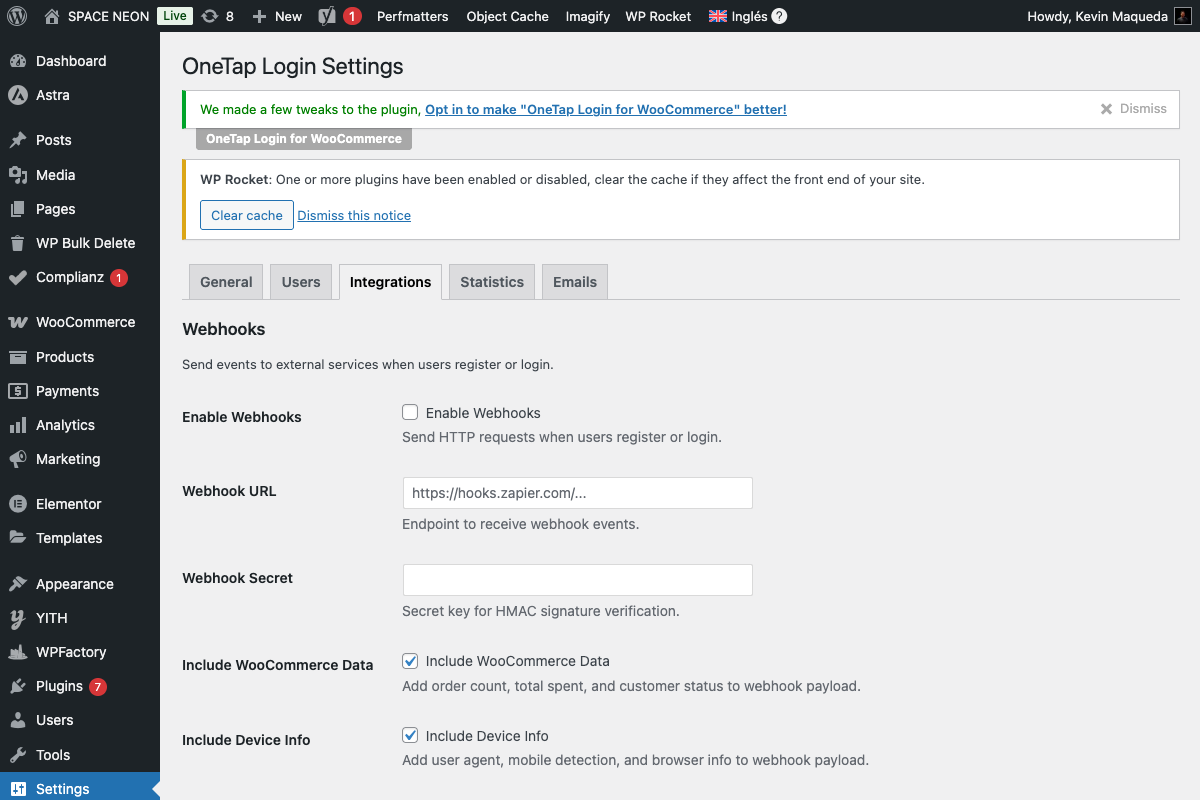
Where to Find Your Secret
- Go to Settings > OneTap Login > Integrations
- Look for Webhook Secret field
- Copy the secret
Regenerating the Secret
To get a new secret:
- Click "Regenerate Secret" button
- Copy new secret
- Update all webhook receivers
- Save settings
Warning: Regenerating invalidates the old secret immediately.
Secret Security
| Do | Don't |
|---|---|
| Store in environment variables | Hardcode in source code |
| Use secrets management | Commit to version control |
| Rotate periodically | Share across environments |
| Limit access | Log the secret |
Error Handling
Common Verification Errors
| Error | Cause | Solution |
|---|---|---|
| Empty signature | Header missing | Check header name case |
| Wrong signature | Secret mismatch | Verify secret is correct |
| Payload mismatch | Body modified | Use raw body, not parsed |
| Encoding issue | Character encoding | Ensure UTF-8 |
Logging Failures
<?php
function verify_and_log($secret) {
    $signature = $_SERVER['HTTP_X_ONETAP_SIGNATURE'] ?? '';
    $payload = file_get_contents('php://input');

    $expected = 'sha256=' . hash_hmac('sha256', $payload, $secret);

    if (!hash_equals($expected, $signature)) {
        error_log('Webhook signature mismatch:');
        error_log('Received: ' . $signature);
        error_log('Expected: ' . $expected);
        error_log('Payload length: ' . strlen($payload));
        return false;
    }

    return true;
}
Testing Signatures
Verify Manually
<?php
// Test script
$secret = 'your_test_secret';
$payload = '{"user_id":123,"email":"test@example.com"}';

$signature = 'sha256=' . hash_hmac('sha256', $payload, $secret);
echo "Signature: " . $signature;

// Use this to verify your implementation
Testing with curl
# Generate signature
SECRET="your_secret"
PAYLOAD='{"user_id":123,"email":"test@example.com"}'
SIGNATURE="sha256=$(echo -n "$PAYLOAD" | openssl dgst -sha256 -hmac "$SECRET" | cut -d' ' -f2)"

# Send test request
curl -X POST https://your-server.com/webhook \
    -H "Content-Type: application/json" \
    -H "X-OneTap-Signature: $SIGNATURE" \
    -H "X-OneTap-Event: user_registered" \
    -H "X-OneTap-Timestamp: $(date +%s)" \
    -d "$PAYLOAD"
Zapier & Make Integration
Zapier
Zapier doesn't support custom signature verification natively. Options:
- Use webhook URL as shared secret (less secure)
- Add signature check in a Code step
- Use Zapier's built-in webhook authentication
Make (Integromat)
Make supports custom header validation:
- Use "Webhook" module
- Add "JSON" parser
- Use filter module to verify signature
// Make.com Code module
const crypto = require('crypto');

const secret = 'your_secret';
const payload = JSON.stringify(body);
const receivedSig = headers['x-onetap-signature'];

const expectedSig = 'sha256=' + crypto
    .createHmac('sha256', secret)
    .update(payload)
    .digest('hex');

if (receivedSig !== expectedSig) {
    throw new Error('Invalid signature');
}

return body;
Security Best Practices
Do's
- Always verify signatures in production
- Use timing-safe comparison functions
- Validate timestamps
- Store secrets securely
- Rotate secrets periodically
- Log verification failures
Don'ts
- Skip verification for "testing"
- Use simple string comparison
- Accept old timestamps
- Log the actual secret
- Use the same secret across environments
Debugging
Signature Mismatch Checklist
-
Correct secret?
- Copy directly from OneTap settings
- No extra whitespace
-
Raw payload?
- Use
file_get_contents('php://input') - Don't use
$_POST(already parsed)
- Use
-
Same encoding?
- UTF-8 throughout
- No BOM characters
-
Header name correct?
X-OneTap-Signature- In PHP:
HTTP_X_ONETAP_SIGNATURE
-
Full signature value?
- Includes
sha256=prefix - 64+ characters total
- Includes
Next Steps
- Webhooks Overview - Complete webhook guide
- Webhook Payload Reference - Payload format
- Security Overview - All security measures