Webhooks Overview
Webhooks allow OneTap Login to send real-time notifications to external services when users register or log in with Google. Connect to Zapier, Make, CRMs, or any custom endpoint.
Webhooks is a PRO feature. Upgrade to PRO to unlock this functionality.
What Are Webhooks?
Webhooks are HTTP callbacks that send data to a URL when an event occurs:
User signs in with Google
        ↓
OneTap Login triggers webhook
        ↓
HTTP POST to your URL
        ↓
External service receives data
        ↓
Automation runs
Supported Events
| Event | Trigger | Use Cases |
|---|---|---|
user_registered | New account created via Google | Welcome emails, CRM sync, onboarding |
user_logged_in | Returning user signs in | Activity tracking, engagement |
Configuration
Accessing Settings
- Go to Settings > OneTap Login
- Click Integrations tab
- Find Webhooks section
Basic Setup
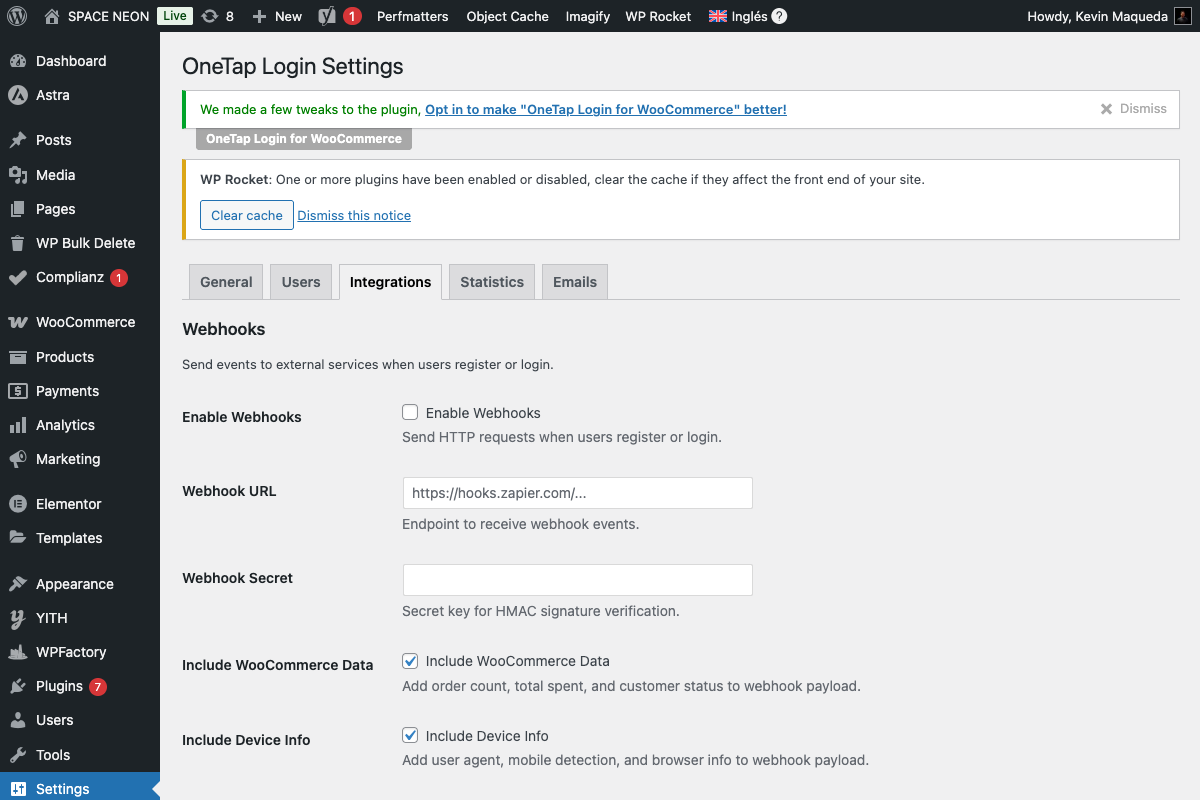
- Enable Webhooks: Toggle on
- Webhook URL: Enter your endpoint
- Secret Key: For signature verification (optional)
- Events: Select which events to send
Webhook URL
Enter the URL where events should be sent:
https://hooks.zapier.com/hooks/catch/123456/abcdef/
https://hook.us1.make.com/abc123xyz
https://yourdomain.com/api/onetap-webhook/
Secret Key
Optional security key for HMAC-SHA256 signatures:
mysecretkey123
The signature is sent in the X-OneTap-Signature header.
Payload Structure
Basic Payload
Every webhook includes:
{
  "event": "user_registered",
  "timestamp": "2024-01-15T10:30:00Z",
  "site_url": "https://yoursite.com",
  "user": {
    "id": 123,
    "email": "john@gmail.com",
    "first_name": "John",
    "last_name": "Smith",
    "role": "customer",
    "google_id": "123456789"
  }
}
Extended Payload Sections
Enable additional data in settings:
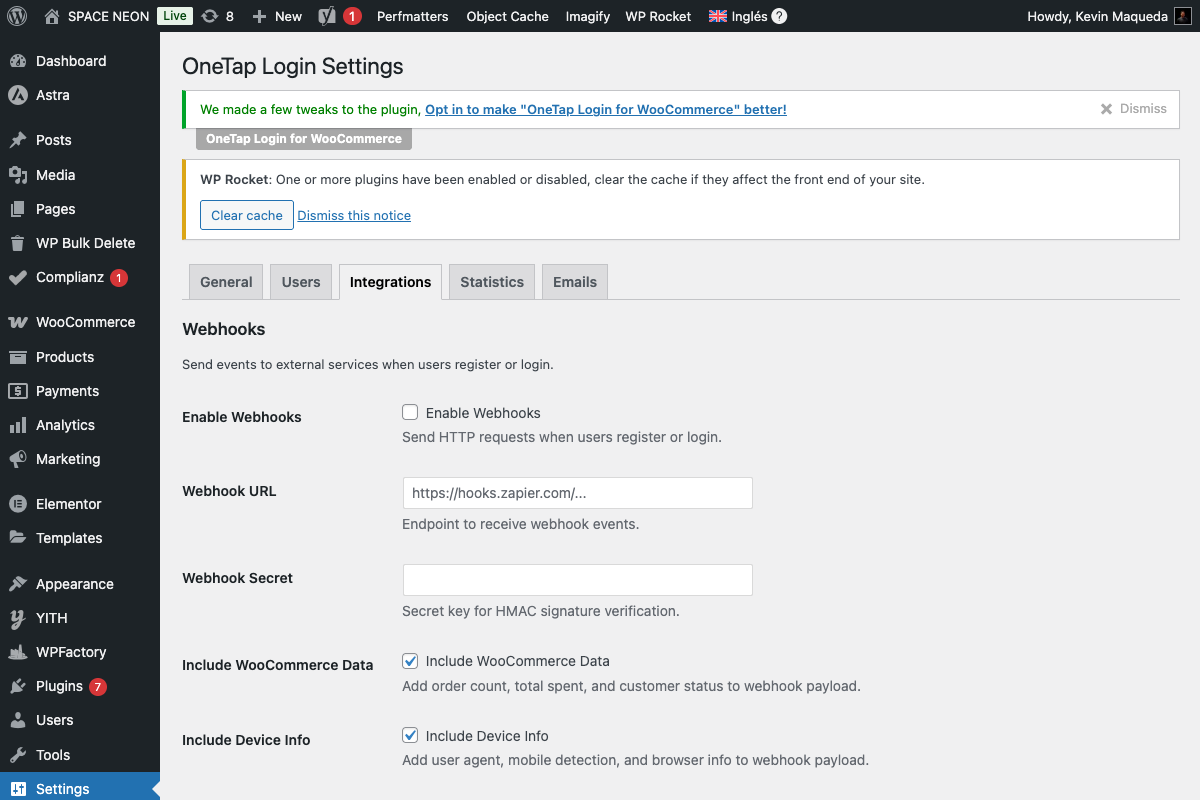
| Section | Data Included |
|---|---|
| User Data | Always included (email, name, role) |
| WooCommerce | Order count, total spent, last order |
| Context | Page URL, referrer, login method |
| Device | Browser, platform, is_mobile |
See Payload Reference for complete documentation.
Integration Options
No-Code Platforms
| Platform | Description |
|---|---|
| Zapier | 5,000+ app integrations |
| Make | Visual automation builder |
| n8n | Self-hosted automation |
| Pabbly | Budget-friendly alternative |
Custom Endpoints
Send to your own servers:
- REST APIs
- Serverless functions (AWS Lambda, Vercel)
- Custom backends
Popular Use Cases
| Use Case | Service | Action |
|---|---|---|
| Add to CRM | HubSpot, Salesforce | Create contact |
| Send welcome | SendGrid, Mailgun | Trigger email |
| Notify team | Slack, Teams | Post message |
| Track analytics | Mixpanel, Amplitude | Track event |
| Update spreadsheet | Google Sheets | Add row |
HTTP Request Details
Method
POST
Headers
Content-Type: application/json
X-OneTap-Event: user_registered
X-OneTap-Signature: sha256=abc123...
X-OneTap-Delivery: uuid-v4
User-Agent: OneTap-Webhook/1.0
Response Handling
| Response Code | Result |
|---|---|
| 2xx | Success, no retry |
| 4xx | Client error, no retry |
| 5xx | Server error, retry with backoff |
| Timeout | Retry with backoff |
Retry Policy
On failure:
- Retry up to 3 times
- Exponential backoff: 1min, 5min, 30min
- Log failures for debugging
Security
Signature Verification
Verify webhooks are from OneTap Login:
$payload = file_get_contents('php://input');
$signature = $_SERVER['HTTP_X_ONETAP_SIGNATURE'];
$secret = 'your_secret_key';

$expected = 'sha256=' . hash_hmac('sha256', $payload, $secret);

if (hash_equals($expected, $signature)) {
    // Valid webhook
}
IP Allowlisting
Webhooks originate from your WordPress server's IP.
HTTPS Required
Always use HTTPS endpoints for security.
Testing Webhooks
Test Button
In settings, click Send Test Webhook to send a sample payload.
Testing Services
Use these to inspect webhooks:
Sample Test Flow
- Get URL from Webhook.site
- Paste into OneTap Login settings
- Click "Send Test Webhook"
- View payload on Webhook.site
- Verify data structure
Debugging
Webhook Logs
View recent webhook deliveries in Integrations > Webhook Logs:
| Field | Description |
|---|---|
| Timestamp | When sent |
| Event | Event type |
| URL | Destination |
| Status | Success/Failed |
| Response | Server response |
Common Issues
| Issue | Solution |
|---|---|
| 401 Unauthorized | Check authentication requirements |
| 403 Forbidden | Verify URL permissions |
| 404 Not Found | Check URL is correct |
| 500 Error | Check receiving server |
| Timeout | Increase server timeout |
Performance
Async Delivery
Webhooks are sent asynchronously:
- Don't block user login
- Processed in background
- Use WordPress cron or Action Scheduler
Rate Limits
- No rate limiting on sending
- Respect receiving service limits
- Batch high-volume events if needed
Disabling Webhooks
To disable:
- Toggle off "Enable Webhooks"
- Or remove the URL
- Save changes
No webhooks will be sent when disabled.
Next Steps
- Payload Reference - Complete payload documentation
- Zapier Integration - Step-by-step Zapier setup
- Make Integration - Step-by-step Make setup