Cookie Consent Integration
OneTap Login includes built-in integration with cookie consent plugins to ensure GDPR compliance. The plugin can detect user consent before displaying the Google sign-in features.
Why Cookie Consent Matters
Google Sign-In uses cookies for authentication. Under GDPR and similar regulations:
- Users must consent before non-essential cookies
- Google authentication cookies may require consent
- Displaying sign-in without consent could be non-compliant
Cookie consent is primarily required for:
- EU (GDPR)
- UK (UK GDPR)
- California (CCPA - limited)
- Brazil (LGPD)
- Other jurisdictions with similar laws
Configuration Options
Accessing Settings
- Go to Settings > OneTap Login
- Find Cookie Consent section in General tab
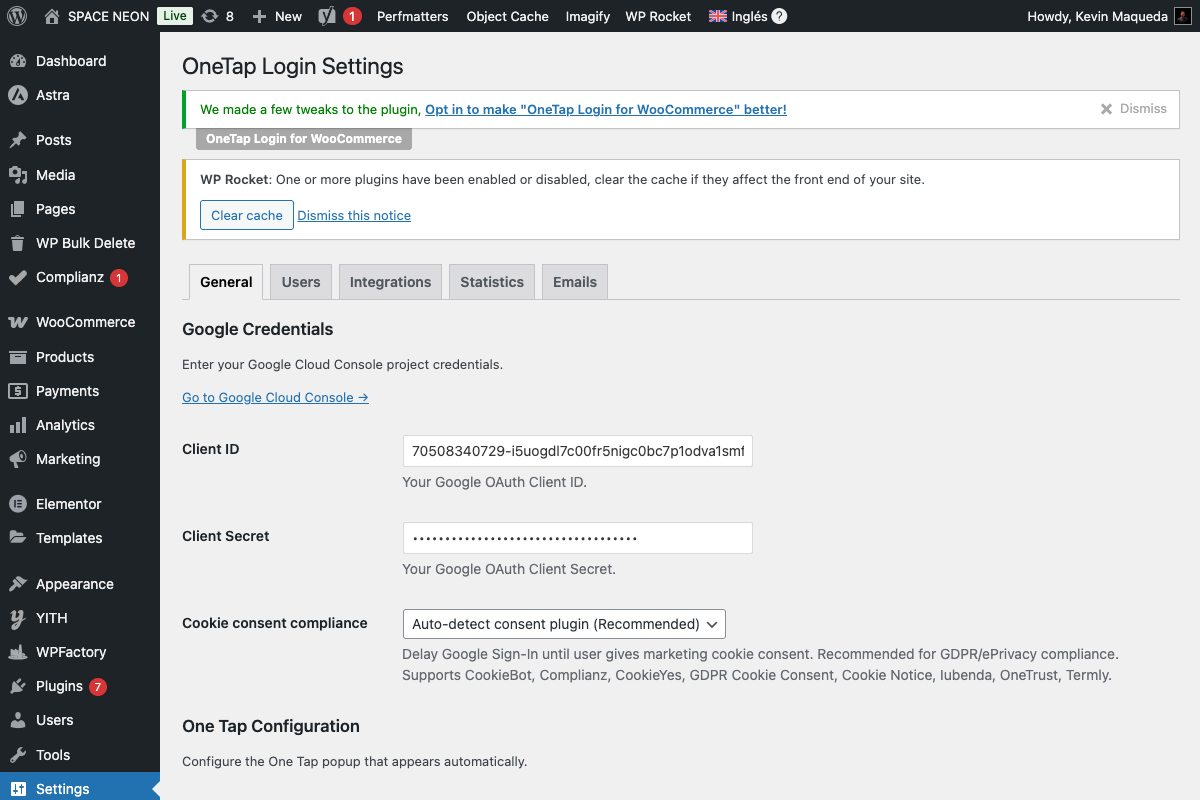
Available Modes
| Mode | Behavior | Use Case |
|---|---|---|
| Disabled | Always show Google sign-in | Non-EU sites, no consent needed |
| Auto-detect | Detect consent plugins, wait for consent | Most sites with consent plugins |
| Always require | Always require consent, even without plugin | Maximum compliance |
Disabled Mode
Respect cookie consent: Disabled
Behavior:
- One Tap popup shows immediately
- Sign-in button always visible
- No consent checking
Use when:
- Your site doesn't require cookie consent
- You're not targeting EU/UK users
- Google login is considered "essential"
Auto-detect Mode (Recommended)
Respect cookie consent: Auto-detect
Behavior:
- Plugin checks for supported consent plugins
- If found, waits for user consent
- Shows Google sign-in only after consent given
- If no consent plugin, shows immediately
Use when:
- You have a cookie consent plugin installed
- You want automatic GDPR compliance
- You need flexibility for different setups
Always Require Mode
Respect cookie consent: Always require
Behavior:
- Always waits for consent signal
- Won't show Google sign-in without explicit consent
- Works even without consent plugin (via WP Consent API)
Use when:
- Maximum compliance required
- Legal team recommends explicit consent
- Highly regulated industries
Supported Consent Plugins
OneTap Login auto-detects these 9 consent plugins:
1. CookieBot (Cybot)
Plugin: CookieBot
Detection method: window.Cookiebot object
Consent check:
Cookiebot.consent.marketing === true
Category: Marketing cookies
2. Complianz
Plugin: Complianz GDPR/CCPA
Detection method: cmplz_* cookies
Consent check:
cmplz_has_consent('marketing')
Category: Marketing cookies
3. GDPR Cookie Consent (WebToffee)
Plugin: GDPR Cookie Consent
Detection method: CLI_* functions
Consent check:
CLI.consent.marketing === true
Category: Marketing/Targeting cookies
4. Cookie Notice
Plugin: Cookie Notice
Detection method: cookie_notice_accepted cookie
Consent check:
document.cookie.includes('cookie_notice_accepted=true')
Category: All cookies (single consent)
5. CookieYes
Plugin: CookieYes
Detection method: window.ckyAllowCategory function
Consent check:
ckyAllowCategory('analytics')
Category: Analytics cookies
6. Iubenda
Plugin: Iubenda Cookie Solution
Detection method: _iub.cs object
Consent check:
_iub.cs.consent.purposes[4] === true
Category: Purpose 4 (Advertising)
7. OneTrust/CookiePro
Plugin: OneTrust
Detection method: OneTrust object
Consent check:
OneTrust.IsActiveGroup('C0004')
Category: C0004 (Targeting cookies)
8. Termly
Plugin: Termly
Detection method: Termly object
Consent check:
Termly.getConsentState().advertising
Category: Advertising cookies
9. WP Consent API
Plugin: WP Consent API
Detection method: wp_has_consent function
Consent check:
wp_has_consent('marketing')
Category: Marketing cookies
How Auto-Detection Works
Detection Flow
Page Load
    ↓
Check for consent plugin → Not found → Show Google Sign-In
    ↓ Found
Check user consent status → Consented → Show Google Sign-In
    ↓ Not consented
Hide Google Sign-In → Wait for consent event
    ↓ User gives consent
Show Google Sign-In
Consent Categories
Google Sign-In typically falls under:
| Plugin | Required Category |
|---|---|
| CookieBot | Marketing |
| Complianz | Marketing |
| GDPR Cookie Consent | Marketing/Targeting |
| Cookie Notice | (any consent) |
| CookieYes | Analytics |
| Iubenda | Purpose 4 |
| OneTrust | C0004 |
| Termly | Advertising |
| WP Consent API | Marketing |
Event Listeners
The plugin listens for consent events:
// CookieBot
window.addEventListener('CookiebotOnAccept', showGoogleSignIn);

// Complianz
document.addEventListener('cmplz_status_change', checkConsent);

// Generic
document.addEventListener('consent_updated', checkConsent);
Configuration Examples
EU E-commerce Store
Respect cookie consent: Auto-detect
Consent plugin: Complianz (or similar)
This setup:
- Detects Complianz on page load
- Checks if marketing cookies accepted
- Shows Google sign-in only after consent
US-Only Store
Respect cookie consent: Disabled
This setup:
- Shows Google sign-in immediately
- No consent checking
- Simpler user experience
Multi-Region Store
Respect cookie consent: Auto-detect
Consent plugin: CookieBot with geolocation
This setup:
- CookieBot handles geolocation
- Consent shown only to EU users
- Google sign-in waits for EU, shows immediately for others
Maximum Compliance
Respect cookie consent: Always require
Consent plugin: OneTrust
This setup:
- Always requires explicit consent
- Most restrictive approach
- Recommended for healthcare, finance, etc.
Troubleshooting
Sign-In Never Appears
Symptom: Google sign-in doesn't show even after consent
Solutions:
- Check if consent plugin is properly detecting consent
- Verify the correct cookie category is accepted
- Test in incognito with fresh consent
- Check browser console for errors
Sign-In Appears Before Consent
Symptom: Google sign-in shows without user consent
Solutions:
- Verify "Auto-detect" or "Always require" is selected
- Check if consent plugin is properly installed
- Ensure consent plugin JavaScript loads before OneTap
- Clear all caches (browser, WordPress, CDN)
Wrong Consent Category
Symptom: Consent for one category doesn't enable sign-in
Solutions:
- Verify which category Google cookies are classified as
- Some consent plugins allow category customization
- Contact consent plugin support for category mapping
Plugin Not Detected
Symptom: "No consent plugin detected" even with one installed
Solutions:
- Ensure consent plugin is activated
- Check for JavaScript errors preventing detection
- Verify consent plugin version is current
- Some plugins need specific settings enabled
Testing Consent Integration
Manual Testing Steps
- Clear cookies - Start fresh
- Visit site - Consent banner should appear
- Verify hidden - Google sign-in should not be visible
- Accept cookies - Click accept on consent banner
- Verify shown - Google sign-in should now appear
Browser Console
Check detection status:
// Type in browser console
console.log('OneTap consent status:', window.onetap_consent_status);
Debug Mode
Enable WordPress debug mode:
// wp-config.php
define('WP_DEBUG', true);
define('WP_DEBUG_LOG', true);
Check /wp-content/debug.log for consent-related messages.
Custom Consent Integration
Using WP Consent API
If your consent plugin isn't supported, use WP Consent API:
- Install WP Consent API
- Configure your consent plugin to integrate with it
- Set OneTap Login to "Auto-detect" or "Always require"
Custom JavaScript Hook
For advanced custom integration:
// Your consent handler
function onConsentGiven() {
    // Trigger OneTap Login to check consent again
    if (window.onetap_check_consent) {
        window.onetap_check_consent();
    }
}
Best Practices
Do's
- Test consent flow thoroughly before launch
- Use auto-detect for most setups
- Keep consent plugin updated
- Document your consent categories
- Verify mobile consent flow
Don'ts
- Don't disable consent for EU users
- Don't assume consent without checking
- Don't forget to test after updates
- Don't ignore consent plugin documentation
GDPR Compliance Checklist
- Cookie consent plugin installed and configured
- OneTap Login set to "Auto-detect" or "Always require"
- Google Sign-In categorized correctly in consent plugin
- Consent banner clearly explains cookie usage
- Privacy policy mentions Google Sign-In
- Tested consent flow on desktop and mobile
- Tested with cookies cleared
Next Steps
- General Settings - Other configuration options
- User Settings - Account creation settings
- GDPR Compliance (Security) - Full security overview