Cookie Consent Plugins
OneTap Login integrates with 9 major cookie consent plugins to ensure GDPR compliance. Google sign-in can be delayed until users consent to functional or marketing cookies.
Why Cookie Consent Matters
GDPR Requirements
Under GDPR and similar laws:
- Cookies require consent before setting
- Google authentication uses cookies
- Non-essential cookies need opt-in
Google Identity Services
Google One Tap and sign-in buttons use:
- Session cookies
- Third-party cookies (for One Tap)
- FedCM (newer browsers)
These may require user consent depending on classification.
Consent Modes
OneTap Login offers three consent modes:
1. Never Wait (Default)
Show Google sign-in immediately
↓
Don't wait for cookie consent
↓
Assume consent or rely on browser settings
Best for: Sites with implied consent or legitimate interest basis.
2. Auto-Detect
Check for supported consent plugin
↓
If found → Wait for consent signal
↓
If not found → Show immediately
Best for: Most GDPR-compliant sites. Recommended setting.
3. Always Wait
Always wait for consent
↓
Listen for consent signals
↓
Only show after any consent signal
Best for: Strict compliance environments.
Configuration
Settings Location
Settings > OneTap Login > General > Cookie Consent
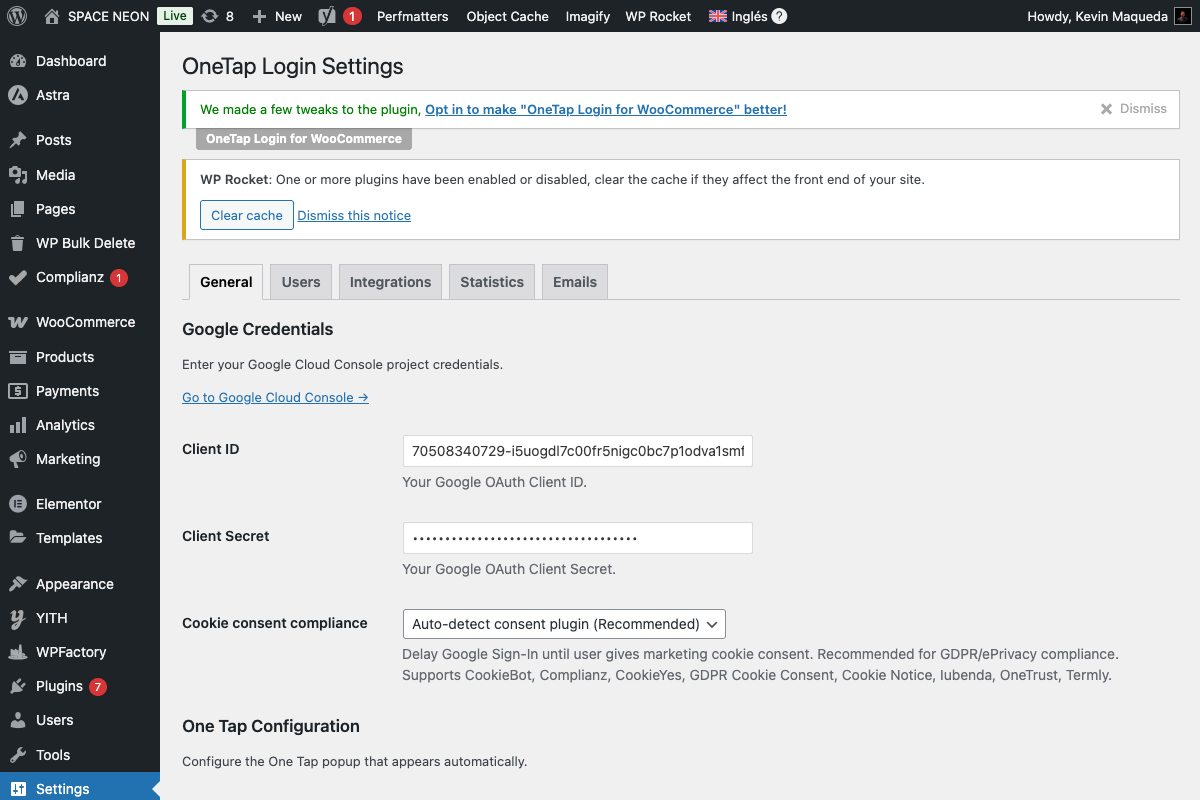
Options
| Option | Behavior |
|---|---|
| Never wait for consent | Always show immediately |
| Auto-detect cookie consent plugin | Check for supported plugins |
| Always wait for consent | Wait for any consent signal |
Supported Plugins
OneTap Login auto-detects these 9 cookie consent plugins:
1. CookieBot (Cybot)
Plugin: Cookiebot CMP
Detection: Cookiebot JavaScript object
Consent Categories:
- Necessary (always allowed)
- Preferences (functional)
- Statistics (analytics)
- Marketing (advertising)
Integration:
// OneTap listens for:
window.addEventListener('CookiebotOnAccept', function() {
    if (Cookiebot.consent.preferences || Cookiebot.consent.marketing) {
        // Show Google sign-in
    }
});
Recommended Category: Preferences or Marketing
2. Complianz
Plugin: Complianz GDPR/CCPA
Detection: complianz JavaScript object or cmplz functions
Consent Categories:
- Functional
- Statistics
- Marketing
Integration:
// OneTap listens for:
document.addEventListener('cmplz_status_change', function() {
    if (cmplz_has_consent('functional') || cmplz_has_consent('marketing')) {
        // Show Google sign-in
    }
});
Recommended Category: Functional
3. GDPR Cookie Consent (WebToffee/CookieLawInfo)
Plugin: GDPR Cookie Consent
Detection: cli_cookie_consent functions
Consent Categories:
- Necessary
- Functional
- Analytics
- Advertisement
Integration:
// OneTap listens for:
document.addEventListener('cli_consent_update', function(e) {
    if (e.detail.functional || e.detail.advertisement) {
        // Show Google sign-in
    }
});
Recommended Category: Functional
4. Cookie Notice (hu-starter)
Plugin: Cookie Notice
Detection: cnArgs object or Cookie Notice functions
Consent Model: Accept/Reject (simple)
Integration:
// OneTap listens for:
document.addEventListener('cookie_notice_accepted', function() {
    // Show Google sign-in
});
5. CookieYes (Termly)
Plugin: CookieYes
Detection: CookieYes or cky functions
Consent Categories:
- Necessary
- Functional
- Analytics
- Advertisement
- Other
Integration:
// OneTap listens for:
document.addEventListener('cookieyes_consent_update', function(e) {
    if (e.detail.accepted.includes('functional')) {
        // Show Google sign-in
    }
});
6. Iubenda Cookie Solution
Plugin: Iubenda Cookie Solution
Detection: _iub object
Consent Categories:
- Purpose 1-5 (configurable)
- Experience
- Functionality
- Measurement
- Marketing
Integration:
// OneTap listens for:
_iub.csConfiguration.callback.onConsentGiven = function() {
    // Show Google sign-in
};
7. OneTrust / CookiePro
Plugin: OneTrust Cookie Consent
Detection: OneTrust or OptanonWrapper function
Consent Categories:
- Strictly Necessary
- Performance
- Functional
- Targeting
Integration:
// OneTap listens for:
function OptanonWrapper() {
    if (OnetrustActiveGroups.includes(',C0003,')) { // Functional
        // Show Google sign-in
    }
}
8. Termly
Plugin: Termly
Detection: Termly object
Consent Categories:
- Essential
- Performance & Analytics
- Functional
- Targeting & Advertising
- Social Media
Integration:
// OneTap listens for consent event
// Checks functional or social_media category
9. WP Consent API
Plugin: WP Consent API
Detection: wp_has_consent function
Purpose: WordPress standard consent API that other plugins can use.
Integration:
// OneTap listens for:
document.addEventListener('wp_consent_type_defined', function() {
    if (wp_has_consent('functional')) {
        // Show Google sign-in
    }
});
Note: This is a unifying API - many consent plugins support it.
How Auto-Detection Works
Detection Order
1. Check for CookieBot
2. Check for Complianz
3. Check for GDPR Cookie Consent
4. Check for Cookie Notice
5. Check for CookieYes
6. Check for Iubenda
7. Check for OneTrust
8. Check for Termly
9. Check for WP Consent API
10. If none found → Show immediately
Detection Code
// Simplified detection logic
function detectConsentPlugin() {
    if (typeof Cookiebot !== 'undefined') return 'cookiebot';
    if (typeof cmplz_has_consent !== 'undefined') return 'complianz';
    if (typeof cli_cookie_consent !== 'undefined') return 'gdpr_cookie_consent';
    // ... more checks
    return null;
}
Consent Categories
Which Category for Google Sign-In?
| Category | Recommendation |
|---|---|
| Strictly Necessary | ❌ Usually not allowed |
| Functional | ✅ Recommended |
| Marketing | ⚠️ If using for advertising |
| Analytics | ❌ Not applicable |
Recommendation: Classify Google sign-in as Functional.
Justification
Google sign-in is:
- Required for user-requested feature (signing in)
- Part of site functionality
- Not for tracking or advertising
Manual Category Override
If auto-detection picks wrong category:
// In your theme's functions.php
add_filter('onetap_consent_category', function($category) {
    return 'functional'; // Force functional category
});
Custom Consent Plugin Support
Using Custom Events
If using an unsupported plugin:
// Fire standard consent event
document.addEventListener('my_plugin_consent_given', function() {
    // Trigger OneTap to check consent
    document.dispatchEvent(new CustomEvent('onetap_check_consent'));
});
PHP Filter
add_filter('onetap_has_consent', function($has_consent) {
    // Check your custom consent solution
    if (my_custom_consent_function()) {
        return true;
    }
    return $has_consent;
});
GDPR Compliance
What to Configure
- Cookie consent plugin: Set up with proper categories
- Privacy policy: Document Google sign-in data use
- OneTap Login: Use Auto-detect mode
- Google Cloud Console: Configure consent screen
Privacy Policy Text
Add to your privacy policy:
## Google Sign-In

We use Google Sign-In to allow you to log in using your Google account.

**Data collected**:
- Email address
- Name (if provided by Google)
- Profile picture URL

**Purpose**: Account authentication and user identification.

**Legal basis**: Contract performance (providing login functionality).

**Third party**: Google LLC (Privacy Shield certified)

For more information, see [Google's Privacy Policy](https://policies.google.com/privacy).
One Tap and Consent
Special Consideration
One Tap has unique behavior:
- Uses third-party cookies
- May show without explicit trigger
- Requires FedCM in newer browsers
Recommendation
If One Tap causes consent issues:
- Keep standard button visible
- Delay One Tap until consent
- Or disable One Tap for strict compliance
// Delay One Tap only (keep button)
add_filter('onetap_one_tap_requires_consent', '__return_true');
Testing Consent Integration
Test Scenarios
-
No consent yet:
- Clear cookies
- Visit site
- Google sign-in should NOT appear (in auto-detect mode)
-
After consent:
- Accept cookies (functional category)
- Google sign-in should appear
-
Consent withdrawn:
- Revoke consent
- Reload page
- Sign-in should hide
Debug Mode
Check browser console for:
OneTap: Detected consent plugin: complianz
OneTap: Waiting for consent...
OneTap: Consent received, initializing...
Troubleshooting
Sign-In Never Appears
Causes:
- Consent not given
- Wrong category configured
- Detection failed
Solutions:
- Check consent banner status
- Verify category in consent plugin
- Try "Never wait" mode temporarily
Sign-In Shows Despite No Consent
Causes:
- Plugin not detected
- "Never wait" mode enabled
- Consent already stored
Solutions:
- Verify plugin active
- Switch to Auto-detect
- Clear cookies and test
One Tap Shows But Button Doesn't
Causes:
- Different consent requirements
- One Tap using FedCM (no cookies)
- Configuration mismatch
Solutions:
- Configure both consistently
- Check browser support
- Review settings
Best Practices
Do's
- Use Auto-detect mode
- Classify as Functional
- Test consent flow regularly
- Update privacy policy
- Monitor consent plugin updates
Don'ts
- Don't force "Strictly Necessary"
- Don't ignore consent requirements
- Don't skip testing
- Don't assume all plugins work same
Next Steps
- Cookie Consent Settings - Basic setup
- GDPR Compliance - Full security guide
- Marketing Consent - Email marketing consent