WordPress Only (No WooCommerce)
OneTap Login works on WordPress sites without WooCommerce, providing Google authentication for blogs, membership sites, and community platforms.
Overview
Why Use Without WooCommerce?
- Blogs: Allow comment authors to sign in
- Membership sites: Easy member registration
- Forums: Quick account creation
- Intranets: Google Workspace authentication
- Learning platforms: Student registration
Available Features
| Feature | WordPress Only | With WooCommerce |
|---|---|---|
| One Tap popup | ✅ | ✅ |
| Sign-in button | ✅ | ✅ |
| wp-login.php | ✅ | ✅ |
| Auto registration | ✅ | ✅ |
| Account linking | ✅ | ✅ |
| Custom redirects | PRO | PRO |
| Role mapping | PRO | PRO |
| Webhooks | PRO | PRO |
| Checkout integration | - | PRO |
| Order attribution | - | PRO |
Installation Without WooCommerce
Requirements
- WordPress 5.8 or higher
- PHP 7.4 or higher
- SSL certificate (HTTPS required)
- WooCommerce not required
Installation Steps
- Download from WordPress.org
- Install via Plugins > Add New
- Activate plugin
- Configure Google credentials
- Test connection
The plugin detects WooCommerce absence and adjusts:
- No checkout integration
- No cart page options
- No order-related features
- Role defaults to WordPress roles
Login Locations
wp-login.php
The WordPress login page shows Google sign-in:
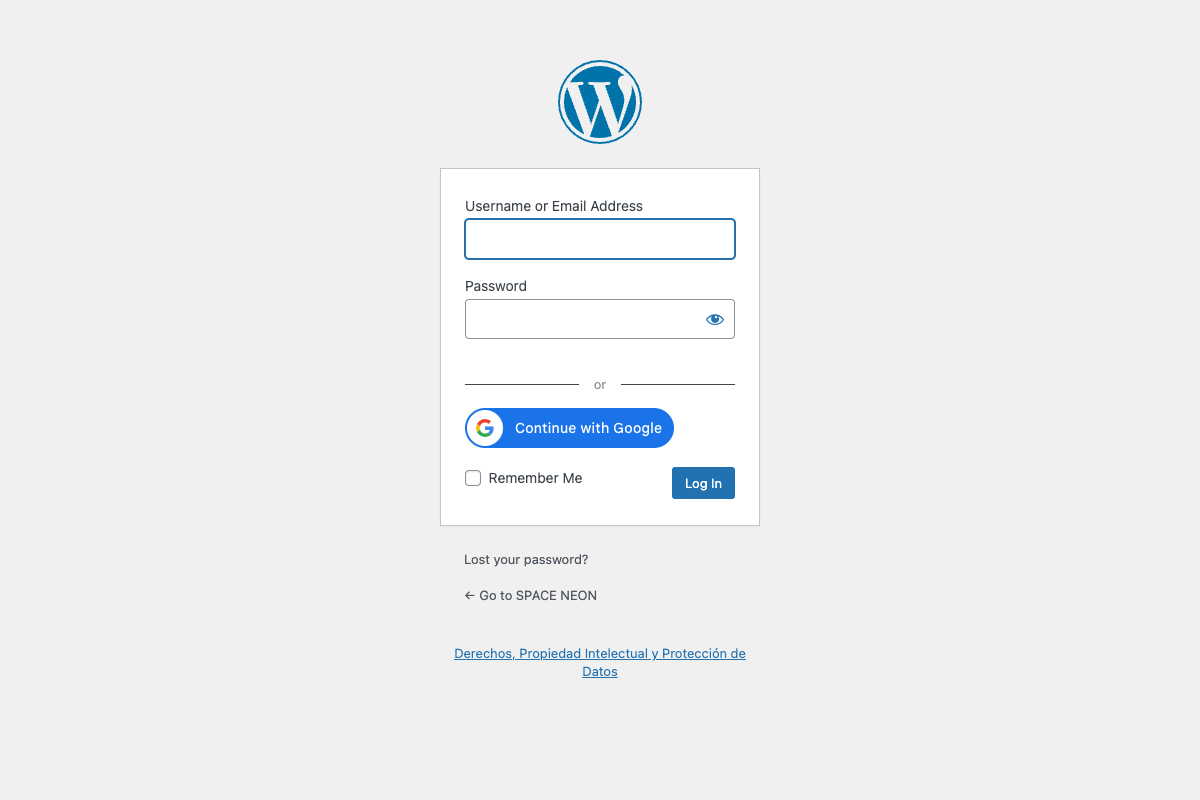
┌────────────────────────────────────────┐
│          [Site Logo]                   │
│                                        │
│  Username or Email Address             │
│  [________________________]            │
│                                        │
│  Password                              │
│  [________________________]            │
│                                        │
│  ☐ Remember Me                         │
│                                        │
│  [        Log In        ]              │
│                                        │
│  ─────── or ───────                    │
│                                        │
│  [G Continue with Google]              │
│                                        │
│  Lost your password?                   │
└────────────────────────────────────────┘
One Tap on wp-login.php
One Tap popup appears on login page:
- Positioned near form
- Same behavior as other pages
- Respects cooldown period
Custom Login Pages
If using custom login plugins:
- Use shortcode
[onetap_button](PRO) - Or integrate via hooks
Configuration
Settings Location
Settings > OneTap Login
Same settings interface, but:
- Checkout/Cart options hidden
- Thank You linking hidden
- Customer role replaced with Subscriber
User Roles
Default role options:
| Role | Capabilities |
|---|---|
| Subscriber | Read only |
| Contributor | Write posts (pending review) |
| Author | Publish own posts |
Cannot assign:
- Administrator
- Editor
Enable/Disable
In General tab:
- Enable One Tap: On login page
- Enable button on wp-login.php: Show button
Membership Site Integration
Paid Memberships Pro
OneTap Login works alongside:
User signs in with Google
        ↓
Account created (Subscriber role)
        ↓
User purchases membership
        ↓
Role upgraded via PMP
MemberPress
Similar flow:
- Google sign-in creates account
- User purchases membership
- MemberPress handles access
Restrict Content Pro
Compatible - Google users can:
- Register as subscribers
- Purchase subscriptions
- Access gated content
Domain Restrictions (PRO)
For B2B memberships:
Allow only: @company.com
Deny: All public emails
BuddyPress/BuddyBoss
Community Sites
For social/community platforms:
Google sign-in → Create WordPress user → BuddyPress profile created
Profile Sync
Google data synced to:
- WordPress user profile
- BuddyPress extended profile (if configured via hook)
Hook Example
add_action('onetap_user_registered', function($user_id, $google_data) {
    // Sync to BuddyPress
    xprofile_set_field_data('First Name', $user_id, $google_data['given_name']);
    xprofile_set_field_data('Last Name', $user_id, $google_data['family_name']);
}, 10, 2);
bbPress (Forums)
Forum Integration
Google users can:
- Register for forums
- Create topics/replies
- Participate immediately
User Roles
| bbPress Role | Assigned Via |
|---|---|
| Spectator | Default (no post) |
| Participant | Can be default |
| Moderator | Manual only |
| Keymaster | Manual only |
LearnDash / LifterLMS
LMS Platforms
Google sign-in simplifies:
- Student registration
- Course enrollment
- Progress tracking
Enrollment Flow
1. Student clicks Google sign-in
2. Account created
3. Student enrolls in course
4. Progress tracked to Google account
Benefits
- Faster registration (remove barriers)
- Verified email addresses
- Easy return access
Comments Integration
Allow Google Sign-In for Comments
Use shortcode or hook to add button near comment form:
add_action('comment_form_top', function() {
    if (!is_user_logged_in()) {
        echo '<div class="google-signin-comments">';
        echo 'Sign in to comment: ';
        echo do_shortcode('[onetap_button text="signin_with" size="medium"]');
        echo '</div>';
    }
});
Benefits
- Reduce spam (verified accounts)
- Faster commenting
- Profile photos from Google
Multisite Configuration
Network-Wide vs Per-Site
| Setup | Description |
|---|---|
| Network activated | Same credentials all sites |
| Per-site activation | Different credentials per site |
Network-Wide
- Network activate plugin
- Configure on main site
- Credentials apply to all
Per-Site
- Activate per site
- Each site has own credentials
- Different Google Cloud projects allowed
Important for Multisite
Each site needs its own:
- Authorized JavaScript origin
- Authorized redirect URI
In Google Cloud Console, add:
https://site1.example.com
https://site2.example.com
https://site3.example.com
Shortcode Usage (PRO)
Login Page Enhancement
[onetap_button text="continue_with" theme="filled_blue"]
Sidebar Widget
Add to text widget:
<h4>Sign In</h4>
[onetap_button text="signin_with" theme="outline"]
Gated Content
<div class="members-only">
    <p>Please sign in to view this content:</p>
    [onetap_button]
</div>
Custom Login Page Themes
Theme My Login
If using Theme My Login:
- Plugin hooks into theme templates
- Button appears automatically
- Or use shortcode in template
WPS Hide Login
If login URL changed:
- Google redirect URI must match
- Update in Google Cloud Console
- Plugin adapts automatically
LoginPress
OneTap Login compatible:
- Button appears in customized form
- Styling may need CSS adjustments
Hooks for WordPress-Only Sites
After Registration
add_action('onetap_user_registered', function($user_id, $google_data) {
    // WordPress-specific actions

    // Set user locale
    update_user_meta($user_id, 'locale', $google_data['locale']);

    // Add to newsletter (if applicable)
    // Send welcome email
    // Log registration
}, 10, 2);
Before Login
add_filter('onetap_allow_login', function($allow, $google_data) {
    // Custom login restrictions
    // Check domain, check blacklist, etc.
    return $allow;
}, 10, 2);
Custom Redirects
add_filter('onetap_login_redirect', function($redirect_url, $user) {
    // Redirect based on role
    if (in_array('subscriber', $user->roles)) {
        return home_url('/members/');
    }
    return $redirect_url;
}, 10, 2);
Admin Area Access
Admin Bar
Google sign-in users see admin bar:
- If role allows
- Navigate to Dashboard
Profile Access
Users can access:
/wp-admin/profile.php- View/edit profile
- Change password (if desired)
Restricting Admin
If you want to prevent admin access for subscribers:
add_action('admin_init', function() {
    if (!current_user_can('edit_posts') && !wp_doing_ajax()) {
        wp_redirect(home_url());
        exit;
    }
});
REST API Authentication
For Headless WordPress
Google sign-in can work with:
- WP REST API
- JWT Authentication
- Custom authentication flows
API Flow
1. User authenticates via Google (frontend)
2. Token validated server-side
3. WordPress user created/logged in
4. Session or JWT issued
5. API requests authenticated
Testing Without WooCommerce
Test Checklist
-
Login page:
- Visit
/wp-login.php - Verify button appears
- Test One Tap popup
- Visit
-
New registration:
- Use new Google account
- Verify user created
- Check role assigned
-
Existing user:
- Match email to existing
- Verify account linking
- Check no duplicate
-
Redirects:
- After login destination
- After registration destination
- Error redirects
Debug Mode
Enable in wp-config.php:
define('WP_DEBUG', true);
define('WP_DEBUG_LOG', true);
Check /wp-content/debug.log for issues.
Troubleshooting
Button Not on wp-login.php
Causes:
- Setting disabled
- Theme override
- Plugin conflict
Solutions:
- Enable in settings
- Check
login_formhook - Test with default theme
Role Not Assigned Correctly
Causes:
- Wrong default role setting
- Other plugin overriding
- Role doesn't exist
Solutions:
- Verify in settings
- Check other user plugins
- Confirm role in WordPress
Redirect Loop
Causes:
- Redirect URL misconfigured
- Security plugin blocking
- Cache issue
Solutions:
- Check redirect settings
- Review security plugin
- Clear all caches
Best Practices
Do's
- Test thoroughly without WooCommerce
- Configure appropriate default role
- Use shortcode for custom login pages
- Enable proper redirects
Don'ts
- Don't assume WooCommerce features work
- Don't use customer role (doesn't exist)
- Don't skip testing login page
- Don't ignore multisite specifics
Next Steps
- Pages & Locations - Where buttons appear
- User Settings - Role configuration
- Custom Redirects - Post-login destinations